
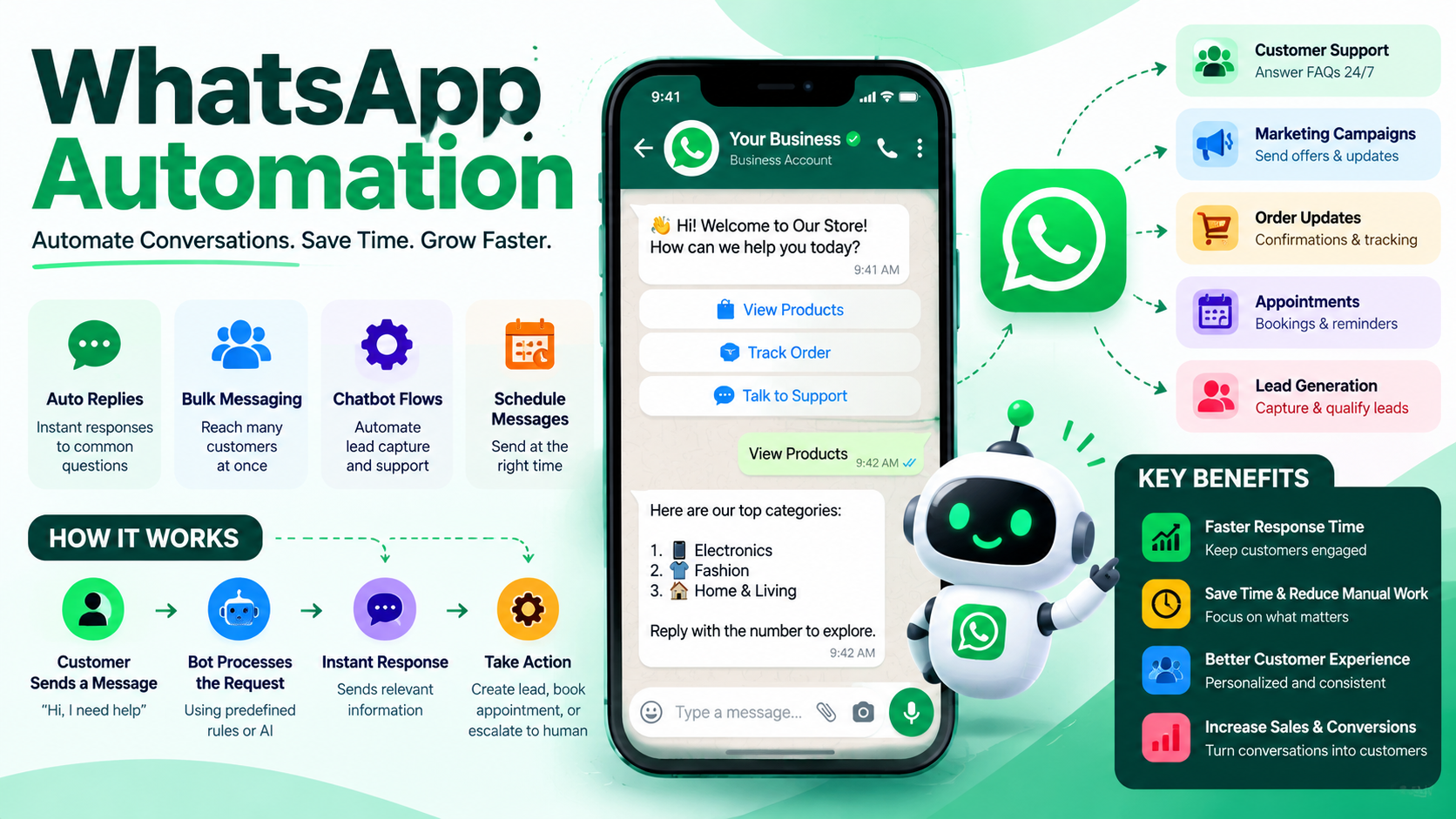
WhatsApp Automation Indian SMEs Actually Use: Catalogs, Bookings, Reminders, Support and Broadcasts
For most Indian small and medium businesses, WhatsApp is not just a messaging app. It is the shopfront, enquiry desk, appointment book, payment reminder system, and customer-support channel—all in one.
Yet many SMEs still handle this manually. Staff copy product details repeatedly, chase appointment confirmations, send payment reminders one by one, and answer the same questions hundreds of times a month.
WhatsApp automation changes this. Not by replacing human staff, but by removing repetitive work so teams can focus on sales, service, and operations.
The businesses winning with WhatsApp are not sending more messages. They are building structured workflows: catalogs, bookings, reminders, support, and broadcasts.
Why WhatsApp Works So Well for Indian SMEs
Indian customers already use WhatsApp daily. They prefer it over installing another app, filling long forms, or calling during business hours.
For an SME, WhatsApp offers three major advantages:
- Zero learning curve: Customers already know how to use it.
- Higher response rates: Messages appear directly in the customer’s chat list.
- Multilingual communication: Businesses can respond in Hindi, English, Hinglish, or regional languages.
The real opportunity is not simply having a WhatsApp Business number. It is connecting that number to automation workflows that capture leads, answer questions, confirm bookings, collect payments, and follow up automatically.
1. WhatsApp Catalogs: Turning Chats Into Sales
A WhatsApp catalog allows businesses to display products or services directly inside chat. Instead of sending photos, prices, and descriptions manually, the business can share a structured catalog link.
Who should use it?
- Boutiques, clothing brands, and jewellery sellers
- Mobile shops, electronics dealers, and hardware stores
- Salons, clinics, coaching institutes, and service providers
- Real-estate consultants and interior designers
What automation adds
A basic catalog shows products. An automated catalog workflow helps customers move from interest to enquiry.
Customer: “Do you have cotton kurtis under ₹1,000?”
Automated reply: “Yes! Here are our latest cotton kurtis under ₹1,000: [Catalog Link]. Reply with the product number to check availability, size chart, or delivery time.”
The system can then tag the enquiry as Product Interest, notify the sales team, and follow up if the customer does not respond within 24 hours.
Practical catalog workflow
- Customer asks about a product or service.
- Bot shares the relevant catalog category.
- Customer selects an item or asks a question.
- Bot shares price, availability, delivery information, or booking link.
- Sales team receives a qualified lead with the customer’s requirement.
This reduces response time and prevents leads from being lost in unread chats.
2. Bookings and Appointments: Stop Losing Customers to Manual Scheduling
Appointment scheduling is one of the highest-value WhatsApp automation use cases for Indian SMEs. It works especially well for clinics, salons, coaching centres, consultants, repair services, and property consultants.
The manual problem
A typical booking process looks like this:
- Customer messages: “Is tomorrow 4 PM available?”
- Staff checks the calendar.
- Staff replies manually.
- Customer confirms.
- Staff sends address and reminder later.
This works until volume increases. Then slots get double-booked, follow-ups are missed, and staff spend hours coordinating.
The automated workflow
Customer: “I want to book a consultation.”
Bot: “Sure. Please choose a service:
1. Property Consultation
2. Legal Documentation
3. Site Visit”

Customer: “1”

Bot: “Available slots tomorrow:
10:00 AM
12:30 PM
4:00 PM”

Customer: “4:00 PM”

Bot: “Your appointment is confirmed for tomorrow at 4:00 PM.
Location: [Google Maps link]
Please reply CONFIRM to acknowledge.”
The system can update a Google Sheet, CRM, Firebase database, or calendar automatically. It can also send a reminder one day before and another reminder two hours before the appointment.
Business impact
- Fewer no-shows through timely reminders
- Fewer double bookings
- Faster lead response
- Less administrative workload for staff
3. Reminders: The Simplest Automation With the Highest ROI
Reminders are often the easiest automation to implement and one of the most profitable. They reduce missed appointments, delayed payments, expired renewals, and abandoned enquiries.
Common reminder use cases
| Business Type | Reminder | Outcome |
|---|---|---|
| Clinic or diagnostic lab | Appointment and report-ready alerts | Fewer missed visits |
| Coaching institute | Class schedules, fee due dates, test reminders | Better attendance and fee collection |
| Salon or spa | Booking confirmation and follow-up offer | Higher repeat bookings |
| Real-estate consultant | Site-visit reminders and document follow-ups | Fewer dropped leads |
| Retail or B2B supplier | Payment due and invoice reminders | Faster collections |
Example: Fee reminder
Message:
“Hello {{name}}, your fee of ₹{{amount}} for {{course_name}} is due on {{due_date}}. You can pay securely here: {{payment_link}}. Reply STOP if you do not wish to receive payment reminders.”
For business-initiated messages outside the 24-hour customer-service window, WhatsApp Business API generally requires pre-approved message templates. Businesses should categorize templates correctly as utility, authentication, or marketing messages and follow Meta’s messaging policies.
4. Customer Support: Answer FAQs Without Hiring More Staff
Most SME support queries are repetitive:
- “What are your timings?”
- “Where is your shop located?”
- “Do you provide home delivery?”
- “What is the price?”
- “Is this available in stock?”
- “How can I track my order?”
A WhatsApp support bot can instantly answer these questions using a knowledge base, product catalog, order system, or FAQ database.
Support workflow
Customer: “Where is my order?”

Bot: “Please share your order ID or registered mobile number.”

Customer: “9876543210”

Bot: “Your order #ORD-2451 was dispatched today and is expected by Thursday.
Track here: {{tracking_link}}

Would you like to speak to a human agent?”
If the bot cannot resolve the issue, it should transfer the chat to a human agent with full context: customer name, previous messages, order details, and issue category.
What good support automation looks like
- Instant answers to common questions
- Order, payment, and booking status updates
- Smart routing to the right team member
- Human handover for complex issues
- Conversation history stored for future reference
The goal is not to hide the business behind a bot. It is to resolve simple queries instantly and escalate important conversations quickly.
5. Broadcasts: Reach the Right Customers Without Spamming
Broadcasts are powerful—but only when used responsibly. Sending the same promotional message to every contact usually leads to blocks, poor engagement, and a damaged brand reputation.
Effective SME broadcasts are segmented, relevant, and timely.
High-performing broadcast examples
- Boutique: “New festive collection is live. Early access for our premium customers.”
- Coaching institute: “Mock test registration closes tomorrow. Reply REGISTER to book your slot.”
- Salon: “Diwali slots are filling fast. Reply BOOK to reserve your appointment.”
- Real-estate consultant: “Three new 2BHK options within your budget have been added. Reply DETAILS to receive the list.”
- Restaurant: “Weekend special menu is now available. Reply MENU to view today’s options.”
Segment before sending
| Segment | Example Message |
|---|---|
| New leads | Welcome message, catalog, consultation booking link |
| Existing customers | Repeat-purchase offer, loyalty update, restock alert |
| Inactive customers | Re-engagement offer or feedback request |
| Payment-due customers | Invoice reminder with payment link |
| Appointment customers | Booking confirmation and visit reminder |
A good broadcast system tracks delivery, reads, replies, clicks, and opt-outs. This helps businesses understand which messages generate revenue and which ones annoy customers.
The Complete WhatsApp Automation Stack
A practical WhatsApp automation system for an Indian SME usually includes:
- WhatsApp Business API: For official, scalable messaging.
- Automation engine: To manage flows, triggers, and conditions.
- CRM or database: To store leads, customers, bookings, and conversation history.
- Catalog or product database: To share accurate pricing and availability.
- Calendar integration: To manage appointments and avoid conflicts.
- Payment links or UPI workflow: To enable faster collections.
- AI assistant: To understand free-text queries and route conversations intelligently.
- Analytics dashboard: To measure leads, bookings, replies, conversions, and revenue.
A simple architecture can look like this:
Customer Message
      ↓
WhatsApp Business API
      ↓
Automation / AI Workflow
      ↓
CRM + Catalog + Calendar + Payments
      ↓
Automated Reply or Human Agent Handover
      ↓
Follow-ups, Reminders, and Broadcasts
Common Mistakes Indian SMEs Make
- Using automation only for promotions: This leads to spam complaints and blocked numbers.
- No human handover: Customers get frustrated when the bot cannot solve a real issue.
- Sending generic messages: A jewellery customer and a coaching parent should not receive the same broadcast.
- Ignoring opt-outs: Respecting customer preferences protects deliverability and trust.
- No lead tagging: Without tags, businesses cannot measure which campaign or product generated revenue.
- Manual data entry: If WhatsApp chats are not connected to a CRM or database, automation remains incomplete.
A 30-Day Implementation Plan
Week 1: Foundation
- Set up WhatsApp Business API and verify the business number.
- Create core message templates for booking, payment, and support.
- Build a customer database with name, phone number, tags, and source.
Week 2: Lead Capture and Catalog
- Publish a product or service catalog.
- Create automated replies for price, availability, location, and timings.
- Add lead-capture forms for high-intent enquiries.
Week 3: Bookings and Reminders
- Connect a calendar or booking database.
- Automate appointment confirmation and reminders.
- Enable payment-link messages for fees, invoices, or advance bookings.
Week 4: Support and Broadcasts
- Deploy an FAQ and order-status assistant.
- Set up human-agent handover rules.
- Launch the first segmented broadcast campaign.
- Track replies, bookings, clicks, and conversions.
Final Thoughts
WhatsApp automation is not about replacing people with bots. It is about giving small teams the leverage of a much larger operation.
Indian SMEs do not need complicated enterprise software to benefit. They need practical workflows that solve daily problems:
- Show products through catalogs.
- Convert enquiries into confirmed bookings.
- Send timely reminders.
- Resolve common support questions instantly.
- Run relevant broadcasts to the right audience.
When these five systems work together, WhatsApp becomes more than a chat channel. It becomes a complete growth engine for the business.
Need this done for your business?
We ship AI chatbots, WhatsApp automation and web platforms in weeks. Websites from ₹12,000.